Puppet Stage: a browser puppet that lip-syncs to local text-to-speech and takes stage directions, live or from a screenplay.
- .claude
- assets
- characters
- docs
- examples
- integrations
- public
- .gitignore 241 bytes
- CLAUDE.md 5.3 KB
- CONTRIBUTING.md 1.9 KB
- LICENSE 1.0 KB
- README.md 11.2 KB
- server.js 51.7 KB
- setup.sh 1.4 KB
Puppet Stage 🎭
A browser puppet with phoneme-accurate lip-sync driven by local text-to-speech (macOS say or espeak), that takes stage direction like an actor reading a teleprompter — walk, wave, emote, look around — live or from a screenplay. Characters are plain SVG + JSON, so they're fully swappable without touching code.
Zero npm dependencies. One Node server, one static page.
Puppetry is the oldest performing art — five thousand years old, give or take — this just wires it to the newest.
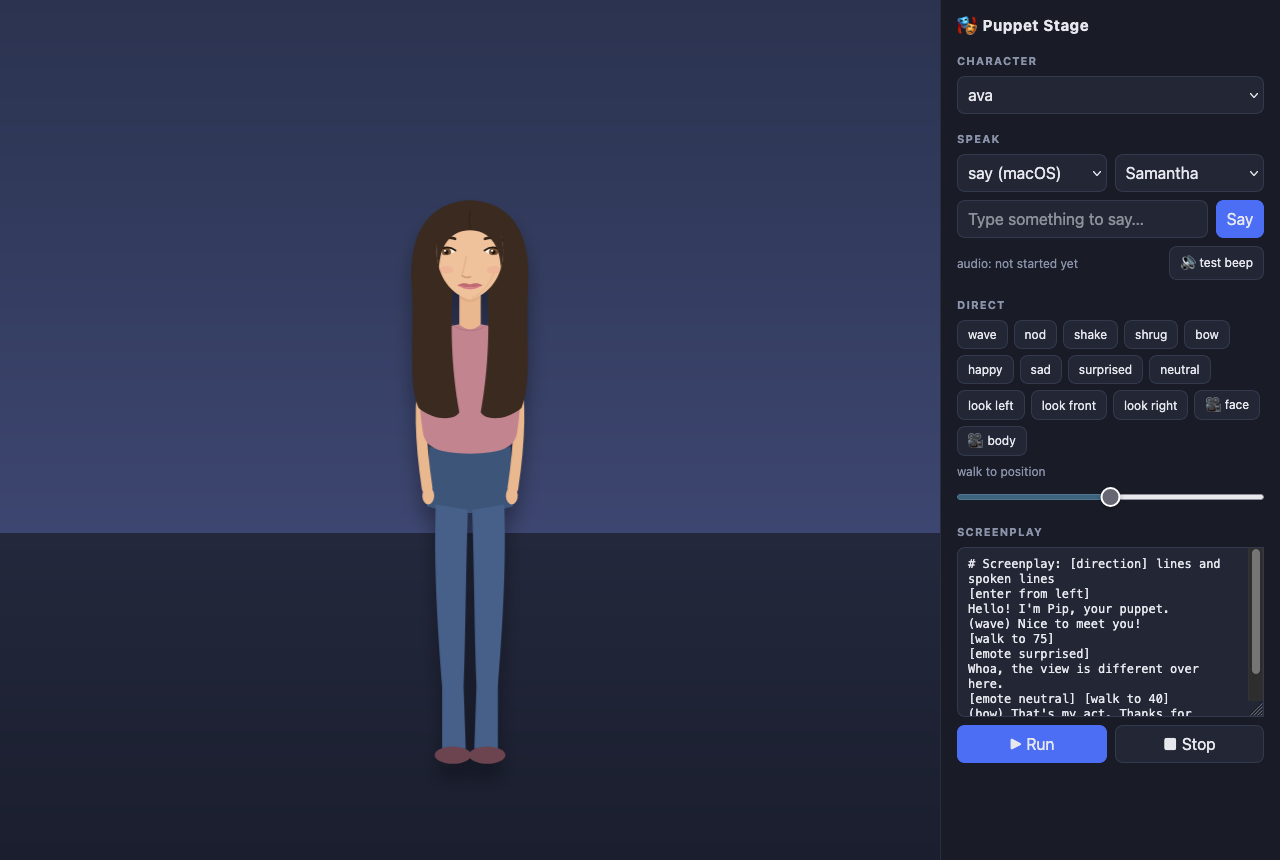 Ava, mid-scene, with the control panel.
Quick start
./setup.sh        # downloads Rhubarb Lip Sync into tools/, checks prerequisites
node server.js    # → http://localhost:3123
Prerequisites: node, ffmpeg (brew install ffmpeg), and a TTS engine — macOS ships say; otherwise brew install espeak / apt install espeak.
How it works
text ──▶ say / espeak ──▶ WAV ──▶ Rhubarb Lip Sync ──▶ viseme timeline (A–H, X)
                           │                                   │
                           └────────── browser plays audio ◀───┘
and swaps mouth shapes on the audio clock- Server (
server.js): renders speech to WAV (cached incache/), runs
Rhubarb Lip Sync to get mouth-shape timings, and broadcasts cues to every connected stage over Server-Sent Events.
- Stage (
public/): plays the audio through Web Audio and schedules mouth
shapes against the audio-context clock, so sync stays tight. If Rhubarb is missing or fails, it degrades to amplitude-driven mouth movement.
- Everything is a cue. Speech, gestures, movement, and emotes all travel
the same bus, so the puppet can be directed from the UI, from the command line, or by a screenplay — and every open browser tab shows the same show.
Screenplay language
Type into the Screenplay box and hit Run. Plain lines are spoken; [bracketed] lines are stage directions; a (parenthesised) prefix fires an action while the line is spoken. A teleprompter overlay follows along.
# comments start with #
[enter from left]
Hello! I'm Pip.
(wave) Nice to meet you!
[walk to 75]              # percent of stage width
[emote surprised]
Whoa!
[emote neutral] [wait 1]
[look left] [look front]
[engine espeak]           # switch TTS engine mid-script
This is my robot voice.
[engine say] [voice Samantha]
And back again.
(bow) Thanks for watching!
[exit right]
Directions: walk to N, enter from left|right, exit left|right, wait N, look left|right|up|down|front, emote <name>, view face|body (camera close-up / full stage), engine say|espeak, voice <name>, rate <n>, captions on|off (broadcast-style subtitles for spoken lines), iris|fade in|out [ms] (fullscreen takes — circular wipe or fade-to-black, default 700ms), or any action name from the character's manifest (wave, jump, nod, shake, bow, dance, shrug, …).
Two characters ship as references: pip, a cartoon blob showing the minimal contract, and ava, a semi-realistic young woman showing the full contract — face view, breathing, gaze drift, and a preferred voice.
Directing from the command line
curl -X POST localhost:3123/api/say    -H 'Content-Type: application/json' \
     -d '{"text":"Hello there","engine":"say","voice":"Samantha"}'
curl -X POST localhost:3123/api/cue    -H 'Content-Type: application/json' \
     -d '{"type":"action","name":"wave"}'
curl -X POST localhost:3123/api/cue    -H 'Content-Type: application/json' \
     -d '{"type":"walk","x":80}'
curl -X POST localhost:3123/api/script -H 'Content-Type: application/json' \
     -d '{"script":"[wave]\nHello!"}'
curl -X POST localhost:3123/api/script/stop
Other endpoints: GET /api/characters, GET /api/voices?engine=say|espeak, GET /api/events (the SSE cue stream, if you want to build another stage).
Integrating your own TTS / STT
If you already have a text-to-speech service, skip the built-in engines and post its rendered audio directly — the server lip-syncs it and plays it on every connected stage. Any format ffmpeg can read works; passing the transcript as ?text= makes the lip-sync noticeably more accurate:
curl -X POST --data-binary @line.mp3 \
     'http://localhost:3123/api/speak-audio?text=Hello%20there'
For speech-to-text, the loop is simply: transcribe → decide a reply → POST /api/say (or /api/speak-audio), sprinkling /api/cue gestures as desired. The stage doesn't care where words come from.
Making a new character
A character is a folder in characters/<name>/ with two files — no code:
puppet.svg— artwork with named parts. Required: one group per
Rhubarb viseme (#mouth-A … #mouth-H, plus #mouth-X for rest). Everything else is up to you.
manifest.json— the contract the runtime animates against:mouths: viseme letter → CSS selector of that mouth shapeblink:{ "target": "#eyes" }(automatic eyelid loop)look:{ "target": ".iris", "dx": 5, "dy": 2 }(selector may match
several elements)walk:{ "speed": 230, "bob": true }views: camera framings, e.g.
`{ "face": { "focus": "#head", "fill": 0.62, "centerY": 0.48 } }` —
enables the face close-up (`[view face]` / `[view body]` in scripts,
🎥 buttons in the UI). Defaults to framing `#head` if omitted.

*`[view face]` zooms the camera to the head framing.*idle: ambient life while not speaking, e.g.
`{ "breathe": { "target": "#torso", "amount": 1.4, "period": 4200 },
"gaze": true }` (gaze randomly drifts the `look` target)voice: preferred TTS, e.g.{ "engine": "say", "voice": "Samantha" }—
selected automatically when the character loadsactions: named animations, each a list of Web-Animations tracks:
`{ "target": "#arm-right", "duration": 1600, "keyframes": [...] }`.
Add `"fill": "forwards"` on a track to hold a pose (emotes), and an
action with `"reset": true` to clear held poses (see `neutral`).
The stage builds its Direct buttons from the manifest, so a character with different abilities automatically gets different controls. Parts that rotate should carry style="transform-box:fill-box;transform-origin:..." in the SVG (see how pip's arms pivot at the shoulder).
The nine visemes are Rhubarb's standard set: A closed (m/b/p), B slightly open with teeth, C open, D wide open, E rounded, F puckered (oo), G teeth on lip (f/v), H tongue up (l), X rest.
Scenes, frames & overlays
The stage isn't limited to one character in one box. A frame is an independent framed region with its own background, content, character, and camera; the screen holds one or more of them side by side (a news two-box, an interview, picture-in-picture). A single talking head is just one frame at full size — the default — so every existing script and API call keeps working unchanged.
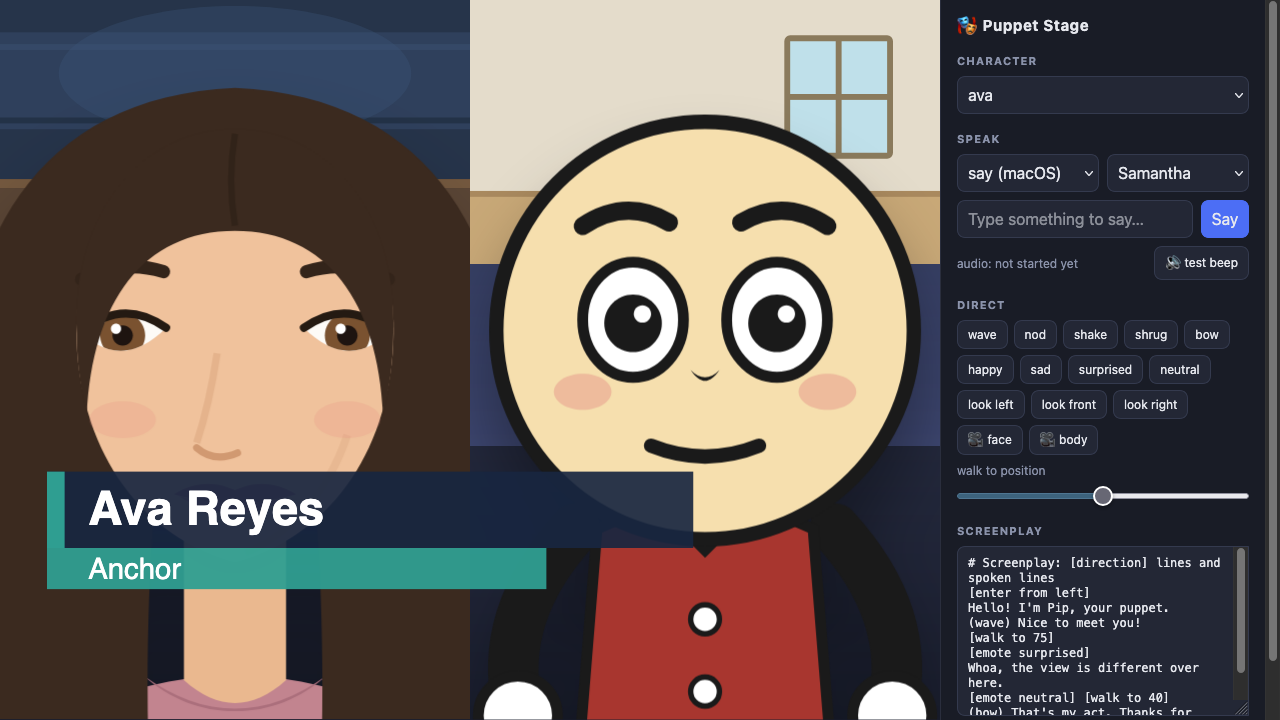 Ava and a vintage rubber-hose-style character, Bo, framed separately with different backgrounds and a broadcast lower-third.
[layout split]
[frame left character:ava bg:desk view:face]
[frame right character:bo bg:room view:face]
left: Good evening.
right: Thanks for having me.
[left wave]
[scene desk]
[show image:chart fit:contain]
[lower-third "Ava Reyes" "Host"]
left: / right: as a line prefix targets that frame's speaker; a [frame ...] direction creates or updates a frame. New cue types for API users: frame, frame-clear, layout, content, scene, overlay — existing character cues (speak, action, walk, look, view, character) now also accept an optional frame field.
Two more directions dress up a scene like a broadcast: [captions on] renders each spoken line as a subtitle at the bottom of the stage — handy for muted or silent playback — and [iris out] / [fade out] (with [iris in] / [fade in] to return) do a fullscreen take: the vintage circular wipe, or a fade to/from black. Both take an optional trailing duration in ms.
[fade in 900]
[captions on]
Where we left off.
[iris out 1200]
An asset library ships in assets/: eleven backgrounds (including a bigtop and theater curtain), eighteen props (hats, a hoop, money, a golden-box, …), five overlay templates (lower-third, title-card, breaking, ticker, balloon), four music loops and four sound effects as JSON note patterns (circus, waltz, sneak, fanfare; tada, boing, thud, chime). Six characters ship in characters/: pip (cartoon minimal), ava and gus (flat semi-realistic), bo and mae (vintage rubber-hose), and rex (a rubber-hose dog who does tricks) — each with its own voice. Scenes can hold placed actors and props ([place rex at 15], [place hoop at 58]), characters can wear props ([wear main tophat]), and music/SFX are scriptable ([music circus], [sfx tada], [music off]) — see docs/design/actors-wearables-music.md. See docs/authoring-assets.md for adding your own, and docs/design/frames-and-scenes.md for the full cue schema and screenplay grammar.
Examples
examples/troll-fable.txt is a runnable two- character screenplay — a fable about manipulation tactics (flattery, urgency, social proof) — exercising frames, lower-thirds, captions, and transitions together. Paste it into the Screenplay box and hit Run.
Notes & troubleshooting
- Safari and sound. Browsers block audio that isn't triggered by a click,
and speech cues arrive over SSE. The stage unlocks audio on your first click or keypress (including Safari's extra silent-buffer ritual). If speech is ever silent, use the 🔊 test beep next to the Speak box: beep silent too → browser/system output problem; beep audible → file an issue.
- Rendered speech is cached in
cache/, keyed by engine + voice + text.
Safe to delete anytime.
- Screenplays pre-render all their speech before playback starts, so shows
begin tight and play with no render gaps between lines.
- Rhubarb's macOS build is x86_64; it runs under Rosetta on Apple Silicon.
- Without Rhubarb the app still works — mouths fall back to loudness-driven
movement instead of phoneme shapes.
http://localhost:3123/?shotdelays page-load completion ~3 s so headless
browser screenshots capture the fully booted stage.
- Recording vertical video. Open
http://localhost:3123/?cleanin a
browser window sized to a 9:16 shape (e.g. 608×1080) — the authoring panel and teleprompter disappear and #stage fills the whole window. Drive the show from a second tab (the normal panel) or the API/a screenplay, and record the clean window with your screen recorder of choice. Use [layout stack] (frames top + bottom) for a two-character vertical composition.
License
MIT — see LICENSE. Rhubarb Lip Sync is a separate MIT-licensed project by Daniel Wolf, downloaded by setup.sh rather than vendored here; its license permits commercial use.